- What is the difference between
undefined and not defined in JavaScript?
In JavaScript, if you try to use a variable that doesn't exist and has not been declared, then JavaScript will throw an error var name is not defined and script will stop executing. However, if you use typeof undeclared_variable, then it will return undefined.
Before getting further into this, let's first understand the difference between declaration and definition.
Let's say var x is a declaration because you have not defined what value it holds yet, but you have declared its existence and the need for memory allocation.
> var x; // declaring x
> console.log(x); //output: undefined
Here var x = 1 is both a declaration and definition (also we can say we are doing an initialisation). In the example above, the declaration and assignment of value happen inline for variable x. In JavaScript, every variable or function declaration you bring to the top of its current scope is called hoisting.
The assignment happens in order, so when we try to access a variable that is declared but not defined yet, we will get the result undefined.
var x; // Declaration
if(typeof x === 'undefined') // Will return true
If a variable that is neither declared nor defined, when we try to reference such a variable we'd get the result not defined.
> console.log(y); // Output: ReferenceError: y is not defined
undefined and not defined in JavaScript?
In JavaScript, if you try to use a variable that doesn't exist and has not been declared, then JavaScript will throw an error
var name is not defined and script will stop executing. However, if you use typeof undeclared_variable, then it will return undefined.
Before getting further into this, let's first understand the difference between declaration and definition.
Let's say
var x is a declaration because you have not defined what value it holds yet, but you have declared its existence and the need for memory allocation.> var x; // declaring x
> console.log(x); //output: undefined
Here
var x = 1 is both a declaration and definition (also we can say we are doing an initialisation). In the example above, the declaration and assignment of value happen inline for variable x. In JavaScript, every variable or function declaration you bring to the top of its current scope is called hoisting.
The assignment happens in order, so when we try to access a variable that is declared but not defined yet, we will get the result
undefined.var x; // Declaration
if(typeof x === 'undefined') // Will return true
If a variable that is neither declared nor defined, when we try to reference such a variable we'd get the result
not defined.> console.log(y); // Output: ReferenceError: y is not defined
- What is the drawback of creating true private methods in JavaScript?
One of the drawbacks of creating true private methods in JavaScript is that they are very memory-inefficient, as a new copy of the method would be created for each instance.
var Employee = function (name, company, salary) {
    this.name = name || "";       //Public attribute default value is null
    this.company = company || ""; //Public attribute default value is null
    this.salary = salary || 5000; //Public attribute default value is null

    // Private method
    var increaseSalary = function () {
        this.salary = this.salary + 1000;
    };

    // Public method
    this.dispalyIncreasedSalary = function() {
        increaseSlary();
        console.log(this.salary);
    };
};

// Create Employee class object
var emp1 = new Employee("John","Pluto",3000);
// Create Employee class object
var emp2 = new Employee("Merry","Pluto",2000);
// Create Employee class object
var emp3 = new Employee("Ren","Pluto",2500);
var Employee = function (name, company, salary) {
this.name = name || ""; //Public attribute default value is null
this.company = company || ""; //Public attribute default value is null
this.salary = salary || 5000; //Public attribute default value is null
// Private method
var increaseSalary = function () {
this.salary = this.salary + 1000;
};
// Public method
this.dispalyIncreasedSalary = function() {
increaseSlary();
console.log(this.salary);
};
};
// Create Employee class object
var emp1 = new Employee("John","Pluto",3000);
// Create Employee class object
var emp2 = new Employee("Merry","Pluto",2000);
// Create Employee class object
var emp3 = new Employee("Ren","Pluto",2500);
Here each instance variable emp1, emp2, emp3 has its own copy of the increaseSalary private method.
So, as a recommendation, don’t use private methods unless it’s necessary.
Here each instance variable
emp1, emp2, emp3 has its own copy of the increaseSalary private method.
So, as a recommendation, don’t use private methods unless it’s necessary.
- Write a
mul function which will produce the following outputs when invoked:
mul function which will produce the following outputs when invoked:
javascript console.log(mul(2)(3)(4)); // output : 24 console.log(mul(4)(3)(4)); // output : 48
Below is the answer followed by an explanation to how it works:
function mul (x) {
    return function (y) { // anonymous function
        return function (z) { // anonymous function
            return x * y * z;
        };
    };
}
Here the mul function accepts the first argument and returns an anonymous function, which takes the second parameter and returns another anonymous function that will take the third parameter and return the multiplication of the arguments that have been passed.
In JavaScript, a function defined inside another one has access to the outer function's variables. Therefore, a function is a first-class object that can be returned by other functions as well and be passed as an argument in another function.
- A function is an instance of the Object type
- A function can have properties and has a link back to its constructor method
- A function can be stored as a variable
- A function can be pass as a parameter to another function
- A function can be returned from another function
javascript console.log(mul(2)(3)(4)); // output : 24 console.log(mul(4)(3)(4)); // output : 48
Below is the answer followed by an explanation to how it works:
function mul (x) {
return function (y) { // anonymous function
return function (z) { // anonymous function
return x * y * z;
};
};
}
Here the
mul function accepts the first argument and returns an anonymous function, which takes the second parameter and returns another anonymous function that will take the third parameter and return the multiplication of the arguments that have been passed.
In JavaScript, a function defined inside another one has access to the outer function's variables. Therefore, a function is a first-class object that can be returned by other functions as well and be passed as an argument in another function.
- A function is an instance of the Object type
- A function can have properties and has a link back to its constructor method
- A function can be stored as a variable
- A function can be pass as a parameter to another function
- A function can be returned from another function
- How to empty an array in JavaScript ?
For instance,
var arrayList = ['a','b','c','d','e','f'];
How can we empty the array above?
There are a couple ways we can use to empty an array, so let's discuss them all.
var arrayList = ['a','b','c','d','e','f'];
Method 1
arrayList = []
Above code will set the variable arrayList to a new empty array. This is recommended if you don't have references to the original array arrayList anywhere else, because it will actually create a new, empty array. You should be careful with this method of emptying the array, because if you have referenced this array from another variable, then the original reference array will remain unchanged.
For Instance,
var arrayList = ['a','b','c','d','e','f']; // Created array
var anotherArrayList = arrayList;  // Referenced arrayList by another variable
arrayList = []; // Empty the array
console.log(anotherArrayList); // Output ['a','b','c','d','e','f']
arrayList = []
arrayList to a new empty array. This is recommended if you don't have references to the original array arrayList anywhere else, because it will actually create a new, empty array. You should be careful with this method of emptying the array, because if you have referenced this array from another variable, then the original reference array will remain unchanged.var arrayList = ['a','b','c','d','e','f']; // Created array
var anotherArrayList = arrayList; // Referenced arrayList by another variable
arrayList = []; // Empty the array
console.log(anotherArrayList); // Output ['a','b','c','d','e','f']
Method 2
arrayList.length = 0;
The code above will clear the existing array by setting its length to 0. This way of emptying the array also updates all the reference variables that point to the original array. Therefore, this method is useful when you want to update all reference variables pointing to arrayList.
For Instance,
var arrayList = ['a','b','c','d','e','f']; // Created array
var anotherArrayList = arrayList;  // Referenced arrayList by another variable
arrayList.length = 0; // Empty the array by setting length to 0
console.log(anotherArrayList); // Output []
arrayList.length = 0;
arrayList.var arrayList = ['a','b','c','d','e','f']; // Created array
var anotherArrayList = arrayList; // Referenced arrayList by another variable
arrayList.length = 0; // Empty the array by setting length to 0
console.log(anotherArrayList); // Output []
Method 3
arrayList.splice(0, arrayList.length);
The implementation above will also work perfectly. This way of emptying the array will also update all the references to the original array.
var arrayList = ['a','b','c','d','e','f']; // Created array
var anotherArrayList = arrayList;  // Referenced arrayList by another variable
arrayList.splice(0, arrayList.length); // Empty the array by setting length to 0
console.log(anotherArrayList); // Output []
arrayList.splice(0, arrayList.length);
var arrayList = ['a','b','c','d','e','f']; // Created array
var anotherArrayList = arrayList; // Referenced arrayList by another variable
arrayList.splice(0, arrayList.length); // Empty the array by setting length to 0
console.log(anotherArrayList); // Output []
Method 4
while(arrayList.length){
    arrayList.pop();
}
The implementation above can also empty arrays, but it is usually not recommended to use this method often.
while(arrayList.length){
arrayList.pop();
}
The implementation above can also empty arrays, but it is usually not recommended to use this method often.
Question 7
How do you check if an object is an array or not?
The best way to find out whether or not an object is an instance of a particular class is to use the toString method from Object.prototype:
var arrayList = [1,2,3];
One of the best use cases of type-checking an object is when we do method overloading in JavaScript. For example, let's say we have a method called greet, which takes one single string and also a list of strings. To make our greet method workable in both situations, we need to know what kind of parameter is being passed. Is it a single value or a list of values?
 function greet(param){
     if(){ // here have to check whether param is array or not
     }else{
     }
 }
However, as the implementation above might not necessarily check the type for arrays, we can check for a single value string and put some array logic code in the else block. For example:
 function greet(param){
     if(typeof param === 'string'){
     }else{
       // If param is of type array then this block of code would execute
     }
 }
Now it's fine we can go with either of the aforementioned two implementations, but when we have a situation where the parameter can be single value, array, and object type, we will be in trouble.
Coming back to checking the type of an object, as mentioned previously we can useObject.prototype.toString
if( Object.prototype.toString.call( arrayList ) === '[object Array]' ) {
    console.log('Array!');
}
If you are using jQuery, then you can also use the jQuery isArray method:
  if($.isArray(arrayList)){
    console.log('Array');
  }else{
      console.log('Not an array');
  }
FYI, jQuery uses Object.prototype.toString.call internally to check whether an object is an array or not.
In modern browsers, you can also use
Array.isArray(arrayList);
Array.isArray is supported by Chrome 5, Firefox 4.0, IE 9, Opera 10.5 and Safari 5
toString method from Object.prototype: var arrayList = [1,2,3];
greet, which takes one single string and also a list of strings. To make our greet method workable in both situations, we need to know what kind of parameter is being passed. Is it a single value or a list of values? function greet(param){
if(){ // here have to check whether param is array or not
}else{
}
}
function greet(param){
if(typeof param === 'string'){
}else{
// If param is of type array then this block of code would execute
}
}
single value, array, and object type, we will be in trouble.Object.prototype.toStringif( Object.prototype.toString.call( arrayList ) === '[object Array]' ) {
console.log('Array!');
}
jQuery, then you can also use the jQuery isArray method: if($.isArray(arrayList)){
console.log('Array');
}else{
console.log('Not an array');
}
Object.prototype.toString.call internally to check whether an object is an array or not.Array.isArray(arrayList);
Array.isArray is supported by Chrome 5, Firefox 4.0, IE 9, Opera 10.5 and Safari 5Question 8
What will be the output of the following code?
var output = (function(x){
    delete x;
    return x;
  })(0);

  console.log(output);
The output would be 0. The delete operator is used to delete properties from an object. Here xis not an object but a local variable. delete operators don't affect local variables.
var output = (function(x){
delete x;
return x;
})(0);
console.log(output);
0. The delete operator is used to delete properties from an object. Here xis not an object but a local variable. delete operators don't affect local variables.Question 9
What will be the output of the following code?
var x = 1;
var output = (function(){
    delete x;
    return x;
  })();

  console.log(output);
The output would be 1. The delete operator is used to delete the property of an object. Here x is not an object, but rather it's the global variable of type number.
var x = 1;
var output = (function(){
delete x;
return x;
})();
console.log(output);
1. The delete operator is used to delete the property of an object. Here x is not an object, but rather it's the global variable of type number.Question 10
What will be the output of the code below?
var x = { foo : 1};
var output = (function(){
    delete x.foo;
    return x.foo;
  })();

  console.log(output);
The output would be undefined. The delete operator is used to delete the property of an object. Here, x is an object which has the property foo, and as it is a self-invoking function, we will delete the foo property from object x. After doing so, when we try to reference a deleted property foo, the result isundefined.
var x = { foo : 1};
var output = (function(){
delete x.foo;
return x.foo;
})();
console.log(output);
The output would be
undefined. The delete operator is used to delete the property of an object. Here, x is an object which has the property foo, and as it is a self-invoking function, we will delete the foo property from object x. After doing so, when we try to reference a deleted property foo, the result isundefined.
- What is the difference between the function declarations below?
 var foo = function(){
    // Some code
 };
 function bar(){
    // Some code
 };
The main difference is the function foo is defined at run-time whereas function bar is defined at parse time. To understand this in better way, let's take a look at the code below:
Run-Time function declaration
<script>
foo(); // Calling foo function here will give an Error
 var foo = function(){
        console.log("Hi I am inside Foo");
 };
 </script>
<script>
Parse-Time function declaration
bar(); // Calling foo function will not give an Error
 function bar(){
    console.log("Hi I am inside Foo");
 };
 </script>
Another advantage of this first-one way of declaration is that you can declare functions based on certain conditions. For example:
<script>
if(testCondition) {// If testCondition is true then
     var foo = function(){
        console.log("inside Foo with testCondition True value");
     };
 }else{
      var foo = function(){
        console.log("inside Foo with testCondition false value");
     };
 }
 </script>
However, if you try to run similar code using the format below, you'd get an error:
<script>
if(testCondition) {// If testCondition is true then
     function foo(){
        console.log("inside Foo with testCondition True value");
     };
 }else{
      function foo(){
        console.log("inside Foo with testCondition false value");
     };
 }
 </script>
var foo = function(){
// Some code
};
function bar(){
// Some code
};
The main difference is the function
foo is defined at run-time whereas function bar is defined at parse time. To understand this in better way, let's take a look at the code below:Run-Time function declaration
<script>
foo(); // Calling foo function here will give an Error
var foo = function(){
console.log("Hi I am inside Foo");
};
</script>
<script>
Parse-Time function declaration
bar(); // Calling foo function will not give an Error
function bar(){
console.log("Hi I am inside Foo");
};
</script>
Another advantage of this first-one way of declaration is that you can declare functions based on certain conditions. For example:
<script>
if(testCondition) {// If testCondition is true then
var foo = function(){
console.log("inside Foo with testCondition True value");
};
}else{
var foo = function(){
console.log("inside Foo with testCondition false value");
};
}
</script>
However, if you try to run similar code using the format below, you'd get an error:
<script>
if(testCondition) {// If testCondition is true then
function foo(){
console.log("inside Foo with testCondition True value");
};
}else{
function foo(){
console.log("inside Foo with testCondition false value");
};
}
</script>
- What is function hoisting in JavaScript?
Function Expression
 var foo = function foo(){
     return 12;
 };
In JavaScript, variable and functions are hoisted. Let's take function hoisting first. Basically, the JavaScript interpreter looks ahead to find all variable declarations and then hoists them to the top of the function where they're declared. For example:
 foo(); // Here foo is still undefined
 var foo = function foo(){
     return 12;
 };
Behind the scene of the code above looks like this:
javascript var foo = undefined; foo(); // Here foo is undefined foo = function foo(){ / Some code stuff }javascript var foo = undefined; foo = function foo(){ / Some code stuff } foo(); // Now foo is defined here
Function Expression
var foo = function foo(){
return 12;
};
In JavaScript, variable and functions are
hoisted. Let's take function hoisting first. Basically, the JavaScript interpreter looks ahead to find all variable declarations and then hoists them to the top of the function where they're declared. For example: foo(); // Here foo is still undefined
var foo = function foo(){
return 12;
};
Behind the scene of the code above looks like this:
javascript var foo = undefined; foo(); // Here foo is undefined foo = function foo(){ / Some code stuff }javascript var foo = undefined; foo = function foo(){ / Some code stuff } foo(); // Now foo is defined here
- What is the
instanceof operator in JavaScript? What would be the output of the code below?
instanceof operator in JavaScript? What would be the output of the code below?
function foo(){
    return foo;
}
new foo() instanceof foo;
Here, instanceof operator checks the current object and returns true if the object is of the specified type.
For Example:
 var dog = new Animal();
 dog instanceof Animal // Output : true
Here dog instanceof Animal is true since dog inherits from Animal.prototype.
 var name = new String("xyz");
 name instanceof String // Output : true
Here name instanceof String is true since dog inherits from String.prototype. Now let's understand the code below:
function foo(){
    return foo;
}
new foo() instanceof foo;
Here function foo is returning foo, which again points to function foo.
function foo(){
    return foo;
}
var bar = new foo();
// here bar is pointer to function foo(){return foo}.
So the new foo() instanceof foo return false;
function foo(){
return foo;
}
new foo() instanceof foo;
Here,
instanceof operator checks the current object and returns true if the object is of the specified type.
For Example:
var dog = new Animal();
dog instanceof Animal // Output : true
Here
dog instanceof Animal is true since dog inherits from Animal.prototype. var name = new String("xyz");
name instanceof String // Output : true
Here
name instanceof String is true since dog inherits from String.prototype. Now let's understand the code below:function foo(){
return foo;
}
new foo() instanceof foo;
Here function
foo is returning foo, which again points to function foo.function foo(){
return foo;
}
var bar = new foo();
// here bar is pointer to function foo(){return foo}.
So the
new foo() instanceof foo return false;Question 21
If we have a JavaScript associative array
  var counterArray = {
           A : 3,
           B : 4
  };
  counterArray["C"] = 1;
var counterArray = {
A : 3,
B : 4
};
counterArray["C"] = 1;
- How can we calculate the length of the above associative array's
counterArray?
counterArray?
There are no in-built functions and properties available to calculate the length of associative array object here. However, there are other ways by which we can calculate the length of an associative array object. In addition to this, we can also extend an Object by adding a method or property to the prototype in order to calculate length. However, extending an object might break enumeration in various libraries or might create cross-browser issues, so it's not recommended unless it's necessary. Again, there are various ways by which we can calculate length.
Object has the keys method which can be used to calculate the length of an object:
Object.keys(counterArray).length // Output 2
We can also calculate the length of an object by iterating through an object and by counting the object's own property.
function getSize(object){
    var count = 0;
    for(key in object){
      // hasOwnProperty method check own property of object
      if(object.hasOwnProperty(key)) count++;
    }
    return count;
}
We can also add a length method directly on Object:
  Object.length = function(){
      var count = 0;
    for(key in object){
      // hasOwnProperty method check own property of object
      if(object.hasOwnProperty(key)) count++;
    }
    return count;
  }
  //Get the size of any object using
  console.log(Object.length(counterArray))
- What will the code below output to the console and why?
(function(){
  var a = b = 3;
})();

console.log("a defined? " + (typeof a !== 'undefined'));
console.log("b defined? " + (typeof b !== 'undefined'));
ans ---
Since both a and b are defined within the enclosing scope of the function, and since the line they are on begins with the varkeyword, most JavaScript developers would expect typeof a and typeof b to both be undefined in the above example.
However, that is not the case. The issue here is that most developers incorrectly understand the statement var a = b = 3; to be shorthand for:
var b = 3;
var a = b;
But in fact, var a = b = 3; is actually shorthand for:
b = 3;
var a = b;
As a result (if you are not using strict mode), the output of the code snippet would be:
a defined? false
b defined? true
But how can b be defined outside of the scope of the enclosing function? Well, since the statement var a = b = 3; is shorthand for the statements b = 3; and var a = b;, b ends up being a global variable (since it is not preceded by the var keyword) and is therefore still in scope even outside of the enclosing function.
Note that, in strict mode (i.e., with use strict), the statement var a = b = 3; will generate a runtime error of ReferenceError: b is not defined, thereby avoiding any headfakes/bugs that might othewise result. (Yet another prime example of why you should use use strict as a matter of course in your code!)
- What will the code below output to the console and why
var myObject = {
    foo: "bar",
    func: function() {
        var self = this;
        console.log("outer func:  this.foo = " + this.foo);
        console.log("outer func:  self.foo = " + self.foo);
        (function() {
            console.log("inner func:  this.foo = " + this.foo);
            console.log("inner func:  self.foo = " + self.foo);
        }());
    }
};
myObject.func();
ans--
The above code will output the following to the console:
outer func:  this.foo = bar
outer func:  self.foo = bar
inner func:  this.foo = undefined
inner func:  self.foo = bar


In the outer function, both this and self refer to myObject and therefore both can properly reference and access foo.

In the inner function, though, this no longer refers to myObject. As a result, this.foo is undefined in the inner function, whereas the reference to the local variable self remains in scope and is accessible there.
- What is the significance of, and reason for, wrapping the entire content of a JavaScript source file in a function block?
This is an increasingly common practice, employed by many popular JavaScript libraries (jQuery, Node.js, etc.). This technique creates a closure around the entire contents of the file which, perhaps most importantly, creates a private namespace and thereby helps avoid potential name clashes between different JavaScript modules and libraries.
Another feature of this technique is to allow for an easily referenceable (presumably shorter) alias for a global variable. This is often used, for example, in jQuery plugins. jQuery allows you to disable the $ reference to the jQuery namespace, using jQuery.noConflict(). If this has been done, your code can still use $ employing this closure technique, as follows:
- What is the significance, and what are the benefits, of including
'use strict' at the beginning of a JavaScript source file?
the short and most important answer here is that use strict is a way to voluntarily enforce stricter parsing and error handling on your JavaScript code at runtime. Code errors that would otherwise have been ignored or would have failed silently will now generate errors or throw exceptions. In general, it is a good practice.
Some of the key benefits of strict mode include:
- Makes debugging easier. Code errors that would otherwise have been ignored or would have failed silently will now generate errors or throw exceptions, alerting you sooner to problems in your code and directing you more quickly to their source.
- Prevents accidental globals. Without strict mode, assigning a value to an undeclared variable automatically creates a global variable with that name. This is one of the most common errors in JavaScript. In strict mode, attempting to do so throws an error.
- Eliminates
this coercion. Without strict mode, a reference to a this value of null or undefined is automatically coerced to the global. This can cause many headfakes and pull-out-your-hair kind of bugs. In strict mode, referencing a a this value of null or undefined throws an error.
- Disallows duplicate property names or parameter values. Strict mode throws an error when it detects a duplicate named property in an object (e.g.,
var object = {foo: "bar", foo: "baz"};) or a duplicate named argument for a function (e.g., function foo(val1, val2, val1){}), thereby catching what is almost certainly a bug in your code that you might otherwise have wasted lots of time tracking down.
- Makes eval() safer. There are some differences in the way
eval() behaves in strict mode and in non-strict mode. Most significantly, in strict mode, variables and functions declared inside of an eval() statement are not created in the containing scope (they are created in the containing scope in non-strict mode, which can also be a common source of problems).
- Throws error on invalid usage of
delete. The delete operator (used to remove properties from objects) cannot be used on non-configurable properties of the object. Non-strict code will fail silently when an attempt is made to delete a non-configurable property, whereas strict mode will throw an error in such a case.
- Consider the two functions below. Will they both return the same thing? Why or why not?
function foo1()
{
  return {
      bar: "hello"
  };
}

function foo2()
{
  return
  {
      bar: "hello"
  };
}
ans=-
Surprisingly, these two functions will not return the same thing. Rather:
console.log("foo1 returns:");
console.log(foo1());
console.log("foo2 returns:");
console.log(foo2());
will yield:
foo1 returns:
Object {bar: "hello"}
foo2 returns:
undefined
Not only is this surprising, but what makes this particularly gnarly is that foo2() returns undefined without any error being thrown.
The reason for this has to do with the fact that semicolons are technically optional in JavaScript (although omitting them is generally really bad form). As a result, when the line containing the return statement (with nothing else on the line) is encountered in foo2(), a semicolon is automatically inserted immediately after the return statement.
No error is thrown since the remainder of the code is perfectly valid, even though it doesn’t ever get invoked or do anything (it is simply an unused code block that defines a property bar which is equal to the string "hello").
This behavior also argues for following the convention of placing an opening curly brace at the end of a line in JavaScript, rather than on the beginning of a new line. As shown here, this becomes more than just a stylistic preference in JavaScript.
- Discuss possible ways to write a function
isInteger(x) that determines if x is an integer.
This may sound trivial and, in fact, it is trivial with ECMAscript 6 which introduces a new Number.isInteger() function for precisely this purpose. However, prior to ECMAScript 6, this is a bit more complicated, since no equivalent of the Number.isInteger()method is provided.
The issue is that, in the ECMAScript specification, integers only exist conceptually; i.e., numeric values are always stored as floating point values.
With that in mind, the simplest and cleanest pre-ECMAScript-6 solution (which is also sufficiently robust to return false even if a non-numeric value such as a string or null is passed to the function) would be the following:
function isInteger(x) { return (x^0) === x; }
The following solution would also work, although not as elegant as the one above:
function isInteger(x) { return Math.round(x) === x; }
Note that Math.ceil() or Math.floor() could be used equally well (instead of Math.round()) in the above implementation.
Or alternatively:
function isInteger(x) { return (typeof x === 'number') && (x % 1 === 0); }
One fairly common incorrect solution is the following:
function isInteger(x) { return parseInt(x, 10) === x; }
While this parseInt-based approach will work well for many values of x, once x becomes quite large, it will fail to work properly. The problem is that parseInt() coerces its first parameter to a string before parsing digits. Therefore, once the number becomes sufficiently large, its string representation will be presented in exponential form (e.g., 1e+21). Accordingly, parseInt() will then try to parse 1e+21, but will stop parsing when it reaches the e character and will therefore return a value of 1. Observe:
> String(1000000000000000000000)
'1e+21'
> parseInt(1000000000000000000000, 10)
1
> parseInt(1000000000000000000000, 10) === 1000000000000000000000
false
- Write a
sum method which will work properly when invoked using either syntax below.
console.log(sum(2,3));   // Outputs 5
console.log(sum(2)(3));  // Outputs 5
ans-
here are (at least) two ways to do this:
METHOD 1
function sum(x) {
  if (arguments.length == 2) {
    return arguments[0] + arguments[1];
  } else {
    return function(y) { return x + y; };
  }
}
In JavaScript, functions provide access to an arguments object which provides access to the actual arguments passed to a function. This enables us to use the length property to determine at runtime the number of arguments passed to the function.
If two arguments are passed, we simply add them together and return.
Otherwise, we assume it was called in the form sum(2)(3), so we return an anonymous function that adds together the argument passed to sum() (in this case 2) and the argument passed to the anonymous function (in this case 3).
METHOD 2
function sum(x, y) {
  if (y !== undefined) {
    return x + y;
  } else {
    return function(y) { return x + y; };
  }
}
When a function is invoked, JavaScript does not require the number of arguments to match the number of arguments in the function definition. If the number of arguments passed exceeds the number of arguments in the function definition, the excess arguments will simply be ignored. On the other hand, if the number of arguments passed is less than the number of arguments in the function definition, the missing arguments will have a value of undefined when referenced within the function. So, in the above example, by simply checking if the 2nd argument is undefined, we can determine which way the function was invoked and proceed accordingly.
- Consider the following code snippet:
for (var i = 0; i < 5; i++) {
  var btn = document.createElement('button');
  btn.appendChild(document.createTextNode('Button ' + i));
  btn.addEventListener('click', function(){ console.log(i); });
  document.body.appendChild(btn);
}
(a) What gets logged to the console when the user clicks on “Button 4” and why?
(b) Provide one or more alternate implementations that will work as expected.
ans==
(a) No matter what button the user clicks the number 5 will always be logged to the console. This is because, at the point that the onclick method is invoked (for any of the buttons), the for loop has already completed and the variable i already has a value of 5. (Bonus points for the interviewee if they know enough to talk about how execution contexts, variable objects, activation objects, and the internal “scope” property contribute to the closure behavior.)
(b) The key to making this work is to capture the value of i at each pass through the for loop by passing it into a newly created function object. Here are three possible ways to accomplish this:
for (var i = 0; i < 5; i++) {
  var btn = document.createElement('button');
  btn.appendChild(document.createTextNode('Button ' + i));
  btn.addEventListener('click', (function(i) {
    return function() { console.log(i); };
  })(i));
  document.body.appendChild(btn);
}
Alternatively, you could wrap the entire call to btn.addEventListener in the new anonymous function:
for (var i = 0; i < 5; i++) {
  var btn = document.createElement('button');
  btn.appendChild(document.createTextNode('Button ' + i));
  (function (i) {
    btn.addEventListener('click', function() { console.log(i); });
  })(i);
  document.body.appendChild(btn);
}
Or, we could replace the for loop with a call to the array object’s native forEach method:
['a', 'b', 'c', 'd', 'e'].forEach(function (value, i) {
  var btn = document.createElement('button');
  btn.appendChild(document.createTextNode('Button ' + i));
  btn.addEventListener('click', function() { console.log(i); });
  document.body.appendChild(btn);
});
- What will the code below output to the console and why ?
console.log(1 + "2" + "2");
console.log(1 + +"2" + "2");
console.log(1 + -"1" + "2");
console.log(+"1" + "1" + "2");
console.log( "A" - "B" + "2");
console.log( "A" - "B" + 2);
The above code will output the following to the console:
"122"
"32"
"02"
"112"
"NaN2"
NaN
Here’s why…
The fundamental issue here is that JavaScript (ECMAScript) is a loosely typed language and it performs automatic type conversion on values to accommodate the operation being performed. Let’s see how this plays out with each of the above examples.
Example 1: 1 + "2" + "2" Outputs: "122" Explanation: The first operation to be performed in 1 + "2". Since one of the operands ("2") is a string, JavaScript assumes it needs to perform string concatenation and therefore converts the type of 1 to "1", 1 + "2" yields "12". Then, "12" + "2" yields "122".
Example 2: 1 + +"2" + "2" Outputs: "32" Explanation: Based on order of operations, the first operation to be performed is +"2"(the extra + before the first "2" is treated as a unary operator). Thus, JavaScript converts the type of "2" to numeric and then applies the unary + sign to it (i.e., treats it as a positive number). As a result, the next operation is now 1 + 2 which of course yields 3. But then, we have an operation between a number and a string (i.e., 3 and "2"), so once again JavaScript converts the type of the numeric value to a string and performs string concatenation, yielding "32".
Example 3: 1 + -"1" + "2" Outputs: "02" Explanation: The explanation here is identical to the prior example, except the unary operator is - rather than +. So "1" becomes 1, which then becomes -1 when the - is applied, which is then added to 1yielding 0, which is then converted to a string and concatenated with the final "2" operand, yielding "02".
Example 4: +"1" + "1" + "2" Outputs: "112" Explanation: Although the first "1" operand is typecast to a numeric value based on the unary + operator that precedes it, it is then immediately converted back to a string when it is concatenated with the second "1" operand, which is then concatenated with the final "2" operand, yielding the string "112".
Example 5: "A" - "B" + "2" Outputs: "NaN2" Explanation: Since the - operator can not be applied to strings, and since neither "A" nor "B" can be converted to numeric values, "A" - "B" yields NaN which is then concatenated with the string "2" to yield “NaN2”.
Example 6: "A" - "B" + 2 Outputs: NaN Explanation: As exlained in the previous example, "A" - "B" yields NaN. But any operator applied to NaN with any other numeric operand will still yield NaN.
- What will the code below output to the console and why?
var arr1 = "john".split('');
var arr2 = arr1.reverse();
var arr3 = "jones".split('');
arr2.push(arr3);
console.log("array 1: length=" + arr1.length + " last=" + arr1.slice(-1));
console.log("array 2: length=" + arr2.length + " last=" + arr2.slice(-1));
The logged output will be:
"array 1: length=5 last=j,o,n,e,s"
"array 2: length=5 last=j,o,n,e,s"
arr1 and arr2 are the same after the above code is executed for the following reasons:
-
Calling an array object’s
reverse() method doesn’t only return the array in reverse order, it also reverses the order of the array itself (i.e., in this case, arr1).
-
The
reverse() method returns a reference to the array itself (i.e., in this case, arr1). As a result, arr2 is simply a reference to (rather than a copy of) arr1. Therefore, when anything is done to arr2 (i.e., when we invoke arr2.push(arr3);), arr1 will be affected as well since arr1 and arr2 are simply references to the same object.
And a couple of side points here that can sometimes trip someone up in answering this question:
-
Passing an array to the
push() method of another array pushes that entire array as a single element onto the end of the array. As a result, the statement arr2.push(arr3); adds arr3 in its entirety as a single element to the end of arr2 (i.e., it does notconcatenate the two arrays, that’s what the concat() method is for).
-
Like Python, JavaScript honors negative subscripts in calls to array methods like
slice() as a way of referencing elements at the end of the array; e.g., a subscript of -1 indicates the last element in the array, and so on.
- The following recursive code will cause a stack overflow if the array list is too large. How can you fix this and still retain the recursive pattern?
var list = readHugeList();

var nextListItem = function() {
    var item = list.pop();

    if (item) {
        // process the list item...
        nextListItem();
    }
};
The potential stack overflow can be avoided by modifying the nextListItem function as follows:
var list = readHugeList();

var nextListItem = function() {
    var item = list.pop();

    if (item) {
        // process the list item...
        setTimeout( nextListItem, 0);
    }
};


The stack overflow is eliminated because the event loop handles the recursion, not the call stack. When nextListItem runs, if item is not null, the timeout function (nextListItem) is pushed to the event queue and the function exits, thereby leaving the call stack clear. When the event queue runs its timed-out event, the next item is processed and a timer is set to again invoke nextListItem. Accordingly, the method is processed from start to finish without a direct recursive call, so the call stack remains clear, regardless of the number of iterations.
- What is the output out of the following code? Explain your answer.
var a={},
    b={key:'b'},
    c={key:'c'};

a[b]=123;
a[c]=456;

console.log(a[b]);
The output of this code will be 456 (not 123).
The reason for this is as follows: When setting an object property, JavaScript will implicitly stringify the parameter value. In this case, since b and c are both objects, they will both be converted to "[object Object]". As a result, a[b] anda[c] are both equivalent to a["[object Object]"] and can be used interchangeably. Therefore, setting or referencing a[c] is precisely the same as setting or referencing a[b].
- Consider the code snippet below. What will the console output be and why?
(function(x) {
return (function(y) {
console.log(x);
})(2)
})(1);
ANS=
The output will be 1, even though the value of x is never set in the inner function. Here’s why:
As explained in our JavaScript Hiring Guide, a closure is a function, along with all variables or functions that were in-scope at the time that the closure was created. In JavaScript, a closure is implemented as an “inner function”; i.e., a function defined within the body of another function. An important feature of closures is that an inner function still has access to the outer function’s variables.
Therefore, in this example, since x is not defined in the inner function, the scope of the outer function is searched for a defined variable x, which is found to have a value of 1.
- **********Create a function that, given a DOM Element on the page, will visit the element itself and all of its descendents (not just its immediate children). For each element visited, the function should pass that element to a provided callback function.
The arguments to the function should be:
- a DOM element
- a callback function (that takes a DOM element as its argument)
function Traverse(p_element,p_callback) {
p_callback(p_element);
var list = p_element.children;
for (var i = 0; i < list.length; i++) {
Traverse(list[i],p_callback); // recursive call
}
}
Although JavaScript is an object-oriented language, it is prototype-based and does not implement a traditional class-based inheritance system.
In JavaScript, each object internally references another object, called its prototype. That prototype object, in turn, has a reference to its prototype object, and so on. At the end of this prototype chain is an object with null as its prototype. The prototype chain is the mechanism by which inheritance – prototypal inheritance to be precise – is achieved in JavaScript. In particular, when a reference is made to a property that an object does not itself contain, the prototype chain is traversed until the referenced property is found (or until the end of the chain is reached, in which case the property is undefined).
Here’s a simple example:
function Animal() { this.eatsVeggies = true; this.eatsMeat = false; }

function Herbivore() {}
Herbivore.prototype = new Animal();

function Carnivore() { this.eatsMeat = true; }
Carnivore.prototype = new Animal();

var rabbit = new Herbivore();
var bear = new Carnivore();

console.log(rabbit.eatsMeat);   // logs "false"
console.log(bear.eatsMeat);     // logs "true"
Compare and contrast objects and hashtables in JavaScript.
This is somewhat of a trick question since, in JavaScript, objects essentially are hashtables; i.e., collections of name-value pairs. In these name-value pairs, a crucial point to be aware of is that the names (a.k.a., keys) are always strings. And that actually leads us to our next question…
Consider the code snippet below (source). What will the alert display? Explain your answer.
var foo = new Object();
var bar = new Object();
var map = new Object();

map[foo] = "foo";
map[bar] = "bar";

alert(map[foo]);  // what will this display??
It is the rare candidate who will correctly answer that this alerts the string “bar”. Most will mistakenly answer that it alerts the string “foo”. So let’s understand why “bar” is indeed the correct, albeit surprising, answer…
As mentioned in the answer to the prior question, a JavaScript object is essentially a hashtable of name-value pairs where the names (i.e., keys) are strings. And they are always strings. In fact, when an object other than a string is used as a key in JavaScript, no error occurs; rather, JavaScript silently converts it to a string and uses that value as the key instead. This can have surprising results, as the above code demonstrates.
To understand the above code snippet, one must first recognize that the map object shown does not map the object foo to the string “foo”, nor does it map the object bar to the string “bar”. Since the objects foo and bar are not strings, when they are used as keys for map, JavaScript automatically converts the key values to strings using each object’s toString() method. And since neither foo nor bar defines its own custom toString() method, they both use the same default implementation. That implementation simply generates the literal string “[object Object]” when it is invoked. With this explanation in mind, let’s re-examine the code snippet above, but this time with explanatory comments along the way:
var foo = new Object();
var bar = new Object();
var map = new Object();

map[foo] = "foo";    // --> map["[Object object]"] = "foo";
map[bar] = "bar";    // --> map["[Object object]"] = "bar";
                     // NOTE: second mapping REPLACES first mapping!

alert(map[foo]);     // --> alert(map["[Object object]"]);
                     // and since map["[Object object]"] = "bar",
                     // this will alert "bar", not "foo"!!
                     //    SURPRISE! ;-)
Explain closures in JavaScript. What are they? What are some of their unique features? How and why might you want to use them? Provide an example.
A closure is a function, along with all variables or functions that were in-scope at the time that the closure was created. In JavaScript, a closure is implemented as an “inner function”; i.e., a function defined within the body of another function. Here is a simplistic example:
(function outerFunc(outerArg) {
  var outerVar = 3;

  (function middleFunc(middleArg) {
    var middleVar = 4;

    (function innerFunc(innerArg) {
      var innerVar = 5;
      // EXAMPLE OF SCOPE IN CLOSURE:
      // Variables from innerFunc, middleFunc, and outerFunc,
      // as well as the global namespace, are ALL in scope here.
      console.log("outerArg="+outerArg+
                  " middleArg="+middleArg+
                  " innerArg="+innerArg+"\n"+
                  " outerVar="+outerVar+
                  " middleVar="+middleVar+
                  " innerVar="+innerVar);
      // --------------- THIS WILL LOG: ---------------
      //    outerArg=123 middleArg=456 innerArg=789
      //    outerVar=3 middleVar=4 innerVar=5
    })(789);
  })(456);
})(123);
An important feature of closures is that an inner function still has access to the outer function’s variables even after the outer function has returned. This is because, when functions in JavaScript execute, they use the scope that was in effect when they were created.
A common point of confusion that this leads to, though, is based on the fact that the inner function accesses the values of the outer function’s variables at the time it is invoked (rather than at the time that it was created). To test the candidate’s understanding of this nuance, present the following code snippet that dynamically creates five buttons and ask what will be displayed when the user clicks on the third button:
function addButtons(numButtons) {
  for (var i = 0; i < numButtons; i++) {
    var button = document.createElement('input');
    button.type = 'button';
    button.value = 'Button ' + (i + 1);
    button.onclick = function() {
      alert('Button ' + (i + 1) + ' clicked');
    };
    document.body.appendChild(button);
    document.body.appendChild(document.createElement('br'));
  }
}

window.onload = function() { addButtons(5); };
Many will mistakenly answer that “Button 3 clicked” will be displayed when the user clicks on the third button. In fact, the above code contains a bug (based on a misunderstanding of the way closures work) and “Button 6 clicked” will be displayed when the user clicks on any of the five buttons. This is because, at the point that the onclick method is invoked (for any of the buttons), the for loop has already completed and the variable ialready has a value of 5.
An important follow-up question is to ask the candidate how to fix the bug in the above code, so as to produce the expected behavior (i.e., so that clicking on button n will display “Button n clicked”). The correct answer, which demonstrates proper use of closures, is as follows:
function addButtons(numButtons) {
  for (var i = 0; i < numButtons; i++) {
    var button = document.createElement('input');
    button.type = 'button';
    button.value = 'Button ' + (i + 1);
    // HERE'S THE FIX:
    // Employ the Immediately-Invoked Function Expression (IIFE)
    // pattern to achieve the desired behavior:
    button.onclick = function(buttonIndex) {
      return function() {
        alert('Button ' + (buttonIndex + 1) + ' clicked');
      };
    }(i);
    document.body.appendChild(button);
    document.body.appendChild(document.createElement('br'));
  }
}

window.onload = function() { addButtons(5); };
Although by no means exclusive to JavaScript, closures are a particularly useful construct for many modern day JavaScript programming paradigms. They are used extensively by some of the most popular JavaScript libraries, such as jQuery and Node.js.
There are no in-built functions and properties available to calculate the length of associative array object here. However, there are other ways by which we can calculate the length of an associative array object. In addition to this, we can also extend an
Object by adding a method or property to the prototype in order to calculate length. However, extending an object might break enumeration in various libraries or might create cross-browser issues, so it's not recommended unless it's necessary. Again, there are various ways by which we can calculate length.Object has the keys method which can be used to calculate the length of an object: Object.keys(counterArray).length // Output 2
We can also calculate the length of an object by iterating through an object and by counting the object's own property.
function getSize(object){
var count = 0;
for(key in object){
// hasOwnProperty method check own property of object
if(object.hasOwnProperty(key)) count++;
}
return count;
}
We can also add a
length method directly on Object: Object.length = function(){
var count = 0;
for(key in object){
// hasOwnProperty method check own property of object
if(object.hasOwnProperty(key)) count++;
}
return count;
}
//Get the size of any object using
console.log(Object.length(counterArray))- What will the code below output to the console and why?
(function(){
var a = b = 3;
})();
console.log("a defined? " + (typeof a !== 'undefined'));
console.log("b defined? " + (typeof b !== 'undefined'));ans ---
Since both
a and b are defined within the enclosing scope of the function, and since the line they are on begins with the varkeyword, most JavaScript developers would expect typeof a and typeof b to both be undefined in the above example.
However, that is not the case. The issue here is that most developers incorrectly understand the statement
var a = b = 3; to be shorthand for:var b = 3;
var a = b;
But in fact,
var a = b = 3; is actually shorthand for:b = 3;
var a = b;
As a result (if you are not using strict mode), the output of the code snippet would be:
a defined? false
b defined? true
But how can
b be defined outside of the scope of the enclosing function? Well, since the statement var a = b = 3; is shorthand for the statements b = 3; and var a = b;, b ends up being a global variable (since it is not preceded by the var keyword) and is therefore still in scope even outside of the enclosing function.
Note that, in strict mode (i.e., with
use strict), the statement var a = b = 3; will generate a runtime error of ReferenceError: b is not defined, thereby avoiding any headfakes/bugs that might othewise result. (Yet another prime example of why you should use use strict as a matter of course in your code!)- What will the code below output to the console and why
var myObject = {
foo: "bar",
func: function() {
var self = this;
console.log("outer func: this.foo = " + this.foo);
console.log("outer func: self.foo = " + self.foo);
(function() {
console.log("inner func: this.foo = " + this.foo);
console.log("inner func: self.foo = " + self.foo);
}());
}
};
myObject.func();
ans--
The above code will output the following to the console:
outer func: this.foo = bar
outer func: self.foo = bar
inner func: this.foo = undefined
inner func: self.foo = bar
In the outer function, both this and self refer to myObject and therefore both can properly reference and access foo.
In the inner function, though, this no longer refers to myObject. As a result, this.foo is undefined in the inner function, whereas the reference to the local variable self remains in scope and is accessible there.
- What is the significance of, and reason for, wrapping the entire content of a JavaScript source file in a function block?
This is an increasingly common practice, employed by many popular JavaScript libraries (jQuery, Node.js, etc.). This technique creates a closure around the entire contents of the file which, perhaps most importantly, creates a private namespace and thereby helps avoid potential name clashes between different JavaScript modules and libraries.
Another feature of this technique is to allow for an easily referenceable (presumably shorter) alias for a global variable. This is often used, for example, in jQuery plugins. jQuery allows you to disable the
$ reference to the jQuery namespace, using jQuery.noConflict(). If this has been done, your code can still use $ employing this closure technique, as follows:- What is the significance, and what are the benefits, of including
'use strict'at the beginning of a JavaScript source file?
the short and most important answer here is that
use strict is a way to voluntarily enforce stricter parsing and error handling on your JavaScript code at runtime. Code errors that would otherwise have been ignored or would have failed silently will now generate errors or throw exceptions. In general, it is a good practice.
Some of the key benefits of strict mode include:
- Makes debugging easier. Code errors that would otherwise have been ignored or would have failed silently will now generate errors or throw exceptions, alerting you sooner to problems in your code and directing you more quickly to their source.
- Prevents accidental globals. Without strict mode, assigning a value to an undeclared variable automatically creates a global variable with that name. This is one of the most common errors in JavaScript. In strict mode, attempting to do so throws an error.
- Eliminates
thiscoercion. Without strict mode, a reference to athisvalue of null or undefined is automatically coerced to the global. This can cause many headfakes and pull-out-your-hair kind of bugs. In strict mode, referencing a athisvalue of null or undefined throws an error. - Disallows duplicate property names or parameter values. Strict mode throws an error when it detects a duplicate named property in an object (e.g.,
var object = {foo: "bar", foo: "baz"};) or a duplicate named argument for a function (e.g.,function foo(val1, val2, val1){}), thereby catching what is almost certainly a bug in your code that you might otherwise have wasted lots of time tracking down. - Makes eval() safer. There are some differences in the way
eval()behaves in strict mode and in non-strict mode. Most significantly, in strict mode, variables and functions declared inside of aneval()statement are not created in the containing scope (they are created in the containing scope in non-strict mode, which can also be a common source of problems). - Throws error on invalid usage of
delete. Thedeleteoperator (used to remove properties from objects) cannot be used on non-configurable properties of the object. Non-strict code will fail silently when an attempt is made to delete a non-configurable property, whereas strict mode will throw an error in such a case.
- Consider the two functions below. Will they both return the same thing? Why or why not?
function foo1()
{
return {
bar: "hello"
};
}
function foo2()
{
return
{
bar: "hello"
};
}
ans=-
Surprisingly, these two functions will not return the same thing. Rather:
console.log("foo1 returns:");
console.log(foo1());
console.log("foo2 returns:");
console.log(foo2());
will yield:
foo1 returns:
Object {bar: "hello"}
foo2 returns:
undefined
Not only is this surprising, but what makes this particularly gnarly is that foo2() returns undefined without any error being thrown.
The reason for this has to do with the fact that semicolons are technically optional in JavaScript (although omitting them is generally really bad form). As a result, when the line containing the return statement (with nothing else on the line) is encountered in foo2(), a semicolon is automatically inserted immediately after the return statement.
No error is thrown since the remainder of the code is perfectly valid, even though it doesn’t ever get invoked or do anything (it is simply an unused code block that defines a property bar which is equal to the string "hello").
This behavior also argues for following the convention of placing an opening curly brace at the end of a line in JavaScript, rather than on the beginning of a new line. As shown here, this becomes more than just a stylistic preference in JavaScript.
- Discuss possible ways to write a function
isInteger(x) that determines if x is an integer.
This may sound trivial and, in fact, it is trivial with ECMAscript 6 which introduces a new Number.isInteger() function for precisely this purpose. However, prior to ECMAScript 6, this is a bit more complicated, since no equivalent of the Number.isInteger()method is provided.
The issue is that, in the ECMAScript specification, integers only exist conceptually; i.e., numeric values are always stored as floating point values.
With that in mind, the simplest and cleanest pre-ECMAScript-6 solution (which is also sufficiently robust to return false even if a non-numeric value such as a string or null is passed to the function) would be the following:
function isInteger(x) { return (x^0) === x; }
The following solution would also work, although not as elegant as the one above:
function isInteger(x) { return Math.round(x) === x; }
Note that Math.ceil() or Math.floor() could be used equally well (instead of Math.round()) in the above implementation.
Or alternatively:
function isInteger(x) { return (typeof x === 'number') && (x % 1 === 0); }
One fairly common incorrect solution is the following:
function isInteger(x) { return parseInt(x, 10) === x; }
While this parseInt-based approach will work well for many values of x, once x becomes quite large, it will fail to work properly. The problem is that parseInt() coerces its first parameter to a string before parsing digits. Therefore, once the number becomes sufficiently large, its string representation will be presented in exponential form (e.g., 1e+21). Accordingly, parseInt() will then try to parse 1e+21, but will stop parsing when it reaches the e character and will therefore return a value of 1. Observe:
> String(1000000000000000000000)
'1e+21'
> parseInt(1000000000000000000000, 10)
1
> parseInt(1000000000000000000000, 10) === 1000000000000000000000
false
- Write a
summethod which will work properly when invoked using either syntax below.
console.log(sum(2,3)); // Outputs 5
console.log(sum(2)(3)); // Outputs 5
ans-
here are (at least) two ways to do this:
METHOD 1
function sum(x) {
if (arguments.length == 2) {
return arguments[0] + arguments[1];
} else {
return function(y) { return x + y; };
}
}
In JavaScript, functions provide access to an
arguments object which provides access to the actual arguments passed to a function. This enables us to use the length property to determine at runtime the number of arguments passed to the function.
If two arguments are passed, we simply add them together and return.
Otherwise, we assume it was called in the form
sum(2)(3), so we return an anonymous function that adds together the argument passed to sum() (in this case 2) and the argument passed to the anonymous function (in this case 3).
METHOD 2
function sum(x, y) {
if (y !== undefined) {
return x + y;
} else {
return function(y) { return x + y; };
}
}
When a function is invoked, JavaScript does not require the number of arguments to match the number of arguments in the function definition. If the number of arguments passed exceeds the number of arguments in the function definition, the excess arguments will simply be ignored. On the other hand, if the number of arguments passed is less than the number of arguments in the function definition, the missing arguments will have a value of
undefined when referenced within the function. So, in the above example, by simply checking if the 2nd argument is undefined, we can determine which way the function was invoked and proceed accordingly.- Consider the following code snippet:
for (var i = 0; i < 5; i++) {
var btn = document.createElement('button');
btn.appendChild(document.createTextNode('Button ' + i));
btn.addEventListener('click', function(){ console.log(i); });
document.body.appendChild(btn);
}
(a) What gets logged to the console when the user clicks on “Button 4” and why?
(b) Provide one or more alternate implementations that will work as expected.
ans==
(a) No matter what button the user clicks the number 5 will always be logged to the console. This is because, at the point that the
onclick method is invoked (for any of the buttons), the for loop has already completed and the variable i already has a value of 5. (Bonus points for the interviewee if they know enough to talk about how execution contexts, variable objects, activation objects, and the internal “scope” property contribute to the closure behavior.)
(b) The key to making this work is to capture the value of
i at each pass through the for loop by passing it into a newly created function object. Here are three possible ways to accomplish this:for (var i = 0; i < 5; i++) {
var btn = document.createElement('button');
btn.appendChild(document.createTextNode('Button ' + i));
btn.addEventListener('click', (function(i) {
return function() { console.log(i); };
})(i));
document.body.appendChild(btn);
}
Alternatively, you could wrap the entire call to
btn.addEventListener in the new anonymous function:for (var i = 0; i < 5; i++) {
var btn = document.createElement('button');
btn.appendChild(document.createTextNode('Button ' + i));
(function (i) {
btn.addEventListener('click', function() { console.log(i); });
})(i);
document.body.appendChild(btn);
}
Or, we could replace the
for loop with a call to the array object’s native forEach method:['a', 'b', 'c', 'd', 'e'].forEach(function (value, i) {
var btn = document.createElement('button');
btn.appendChild(document.createTextNode('Button ' + i));
btn.addEventListener('click', function() { console.log(i); });
document.body.appendChild(btn);
});
- What will the code below output to the console and why ?
console.log(1 + "2" + "2");
console.log(1 + +"2" + "2");
console.log(1 + -"1" + "2");
console.log(+"1" + "1" + "2");
console.log( "A" - "B" + "2");
console.log( "A" - "B" + 2);
The above code will output the following to the console:
"122"
"32"
"02"
"112"
"NaN2"
NaN
Here’s why…
The fundamental issue here is that JavaScript (ECMAScript) is a loosely typed language and it performs automatic type conversion on values to accommodate the operation being performed. Let’s see how this plays out with each of the above examples.
Example 1: 1 + "2" + "2" Outputs: "122" Explanation: The first operation to be performed in 1 + "2". Since one of the operands ("2") is a string, JavaScript assumes it needs to perform string concatenation and therefore converts the type of 1 to "1", 1 + "2" yields "12". Then, "12" + "2" yields "122".
Example 2: 1 + +"2" + "2" Outputs: "32" Explanation: Based on order of operations, the first operation to be performed is +"2"(the extra + before the first "2" is treated as a unary operator). Thus, JavaScript converts the type of "2" to numeric and then applies the unary + sign to it (i.e., treats it as a positive number). As a result, the next operation is now 1 + 2 which of course yields 3. But then, we have an operation between a number and a string (i.e., 3 and "2"), so once again JavaScript converts the type of the numeric value to a string and performs string concatenation, yielding "32".
Example 3: 1 + -"1" + "2" Outputs: "02" Explanation: The explanation here is identical to the prior example, except the unary operator is - rather than +. So "1" becomes 1, which then becomes -1 when the - is applied, which is then added to 1yielding 0, which is then converted to a string and concatenated with the final "2" operand, yielding "02".
Example 4: +"1" + "1" + "2" Outputs: "112" Explanation: Although the first "1" operand is typecast to a numeric value based on the unary + operator that precedes it, it is then immediately converted back to a string when it is concatenated with the second "1" operand, which is then concatenated with the final "2" operand, yielding the string "112".
Example 5: "A" - "B" + "2" Outputs: "NaN2" Explanation: Since the - operator can not be applied to strings, and since neither "A" nor "B" can be converted to numeric values, "A" - "B" yields NaN which is then concatenated with the string "2" to yield “NaN2”.
Example 6: "A" - "B" + 2 Outputs: NaN Explanation: As exlained in the previous example, "A" - "B" yields NaN. But any operator applied to NaN with any other numeric operand will still yield NaN.
- What will the code below output to the console and why?
var arr1 = "john".split('');
var arr2 = arr1.reverse();
var arr3 = "jones".split('');
arr2.push(arr3);
console.log("array 1: length=" + arr1.length + " last=" + arr1.slice(-1));
console.log("array 2: length=" + arr2.length + " last=" + arr2.slice(-1));
The logged output will be:
"array 1: length=5 last=j,o,n,e,s"
"array 2: length=5 last=j,o,n,e,s"
arr1 and arr2 are the same after the above code is executed for the following reasons:- Calling an array object’s
reverse()method doesn’t only return the array in reverse order, it also reverses the order of the array itself (i.e., in this case,arr1). - The
reverse()method returns a reference to the array itself (i.e., in this case,arr1). As a result,arr2is simply a reference to (rather than a copy of)arr1. Therefore, when anything is done toarr2(i.e., when we invokearr2.push(arr3);),arr1will be affected as well sincearr1andarr2are simply references to the same object.
And a couple of side points here that can sometimes trip someone up in answering this question:
- Passing an array to the
push()method of another array pushes that entire array as a single element onto the end of the array. As a result, the statementarr2.push(arr3);addsarr3in its entirety as a single element to the end ofarr2(i.e., it does notconcatenate the two arrays, that’s what theconcat()method is for). - Like Python, JavaScript honors negative subscripts in calls to array methods like
slice()as a way of referencing elements at the end of the array; e.g., a subscript of -1 indicates the last element in the array, and so on.
- The following recursive code will cause a stack overflow if the array list is too large. How can you fix this and still retain the recursive pattern?
var list = readHugeList();
var nextListItem = function() {
var item = list.pop();
if (item) {
// process the list item...
nextListItem();
}
};
The potential stack overflow can be avoided by modifying the nextListItem function as follows:
var list = readHugeList();
var nextListItem = function() {
var item = list.pop();
if (item) {
// process the list item...
setTimeout( nextListItem, 0);
}
};
The stack overflow is eliminated because the event loop handles the recursion, not the call stack. When nextListItem runs, if item is not null, the timeout function (nextListItem) is pushed to the event queue and the function exits, thereby leaving the call stack clear. When the event queue runs its timed-out event, the next item is processed and a timer is set to again invoke nextListItem. Accordingly, the method is processed from start to finish without a direct recursive call, so the call stack remains clear, regardless of the number of iterations.
- What is the output out of the following code? Explain your answer.
var a={},
b={key:'b'},
c={key:'c'};
a[b]=123;
a[c]=456;
console.log(a[b]);
The output of this code will be 456 (not 123).
The reason for this is as follows: When setting an object property, JavaScript will implicitly stringify the parameter value. In this case, since b and c are both objects, they will both be converted to "[object Object]". As a result, a[b] anda[c] are both equivalent to a["[object Object]"] and can be used interchangeably. Therefore, setting or referencing a[c] is precisely the same as setting or referencing a[b].
- Consider the code snippet below. What will the console output be and why?
(function(x) {
return (function(y) {
console.log(x);
})(2)
})(1);
ANS=
The output will be 1, even though the value of x is never set in the inner function. Here’s why:
As explained in our JavaScript Hiring Guide, a closure is a function, along with all variables or functions that were in-scope at the time that the closure was created. In JavaScript, a closure is implemented as an “inner function”; i.e., a function defined within the body of another function. An important feature of closures is that an inner function still has access to the outer function’s variables.
Therefore, in this example, since x is not defined in the inner function, the scope of the outer function is searched for a defined variable x, which is found to have a value of 1.
- **********Create a function that, given a DOM Element on the page, will visit the element itself and all of its descendents (not just its immediate children). For each element visited, the function should pass that element to a provided callback function.
The arguments to the function should be:
- a DOM element
- a callback function (that takes a DOM element as its argument)
function Traverse(p_element,p_callback) {
p_callback(p_element);
var list = p_element.children;
for (var i = 0; i < list.length; i++) {
Traverse(list[i],p_callback); // recursive call
}
}
Although JavaScript is an object-oriented language, it is prototype-based and does not implement a traditional class-based inheritance system.
In JavaScript, each object internally references another object, called its prototype. That prototype object, in turn, has a reference to its prototype object, and so on. At the end of this prototype chain is an object with null as its prototype. The prototype chain is the mechanism by which inheritance – prototypal inheritance to be precise – is achieved in JavaScript. In particular, when a reference is made to a property that an object does not itself contain, the prototype chain is traversed until the referenced property is found (or until the end of the chain is reached, in which case the property is undefined).
Here’s a simple example:
function Animal() { this.eatsVeggies = true; this.eatsMeat = false; }
function Herbivore() {}
Herbivore.prototype = new Animal();
function Carnivore() { this.eatsMeat = true; }
Carnivore.prototype = new Animal();
var rabbit = new Herbivore();
var bear = new Carnivore();
console.log(rabbit.eatsMeat); // logs "false"
console.log(bear.eatsMeat); // logs "true"
Compare and contrast objects and hashtables in JavaScript.
This is somewhat of a trick question since, in JavaScript, objects essentially are hashtables; i.e., collections of name-value pairs. In these name-value pairs, a crucial point to be aware of is that the names (a.k.a., keys) are always strings. And that actually leads us to our next question…
Consider the code snippet below (source). What will the alert display? Explain your answer.
var foo = new Object();
var bar = new Object();
var map = new Object();
map[foo] = "foo";
map[bar] = "bar";
alert(map[foo]); // what will this display??
It is the rare candidate who will correctly answer that this alerts the string “bar”. Most will mistakenly answer that it alerts the string “foo”. So let’s understand why “bar” is indeed the correct, albeit surprising, answer…
As mentioned in the answer to the prior question, a JavaScript object is essentially a hashtable of name-value pairs where the names (i.e., keys) are strings. And they are always strings. In fact, when an object other than a string is used as a key in JavaScript, no error occurs; rather, JavaScript silently converts it to a string and uses that value as the key instead. This can have surprising results, as the above code demonstrates.
To understand the above code snippet, one must first recognize that the
map object shown does not map the object foo to the string “foo”, nor does it map the object bar to the string “bar”. Since the objects foo and bar are not strings, when they are used as keys for map, JavaScript automatically converts the key values to strings using each object’s toString() method. And since neither foo nor bar defines its own custom toString() method, they both use the same default implementation. That implementation simply generates the literal string “[object Object]” when it is invoked. With this explanation in mind, let’s re-examine the code snippet above, but this time with explanatory comments along the way:var foo = new Object();
var bar = new Object();
var map = new Object();
map[foo] = "foo"; // --> map["[Object object]"] = "foo";
map[bar] = "bar"; // --> map["[Object object]"] = "bar";
// NOTE: second mapping REPLACES first mapping!
alert(map[foo]); // --> alert(map["[Object object]"]);
// and since map["[Object object]"] = "bar",
// this will alert "bar", not "foo"!!
// SURPRISE! ;-)
Explain closures in JavaScript. What are they? What are some of their unique features? How and why might you want to use them? Provide an example.
A closure is a function, along with all variables or functions that were in-scope at the time that the closure was created. In JavaScript, a closure is implemented as an “inner function”; i.e., a function defined within the body of another function. Here is a simplistic example:
(function outerFunc(outerArg) {
var outerVar = 3;
(function middleFunc(middleArg) {
var middleVar = 4;
(function innerFunc(innerArg) {
var innerVar = 5;
// EXAMPLE OF SCOPE IN CLOSURE:
// Variables from innerFunc, middleFunc, and outerFunc,
// as well as the global namespace, are ALL in scope here.
console.log("outerArg="+outerArg+
" middleArg="+middleArg+
" innerArg="+innerArg+"\n"+
" outerVar="+outerVar+
" middleVar="+middleVar+
" innerVar="+innerVar);
// --------------- THIS WILL LOG: ---------------
// outerArg=123 middleArg=456 innerArg=789
// outerVar=3 middleVar=4 innerVar=5
})(789);
})(456);
})(123);
An important feature of closures is that an inner function still has access to the outer function’s variables even after the outer function has returned. This is because, when functions in JavaScript execute, they use the scope that was in effect when they were created.
A common point of confusion that this leads to, though, is based on the fact that the inner function accesses the values of the outer function’s variables at the time it is invoked (rather than at the time that it was created). To test the candidate’s understanding of this nuance, present the following code snippet that dynamically creates five buttons and ask what will be displayed when the user clicks on the third button:
function addButtons(numButtons) {
for (var i = 0; i < numButtons; i++) {
var button = document.createElement('input');
button.type = 'button';
button.value = 'Button ' + (i + 1);
button.onclick = function() {
alert('Button ' + (i + 1) + ' clicked');
};
document.body.appendChild(button);
document.body.appendChild(document.createElement('br'));
}
}
window.onload = function() { addButtons(5); };
Many will mistakenly answer that “Button 3 clicked” will be displayed when the user clicks on the third button. In fact, the above code contains a bug (based on a misunderstanding of the way closures work) and “Button 6 clicked” will be displayed when the user clicks on any of the five buttons. This is because, at the point that the onclick method is invoked (for any of the buttons), the for loop has already completed and the variable
ialready has a value of 5.
An important follow-up question is to ask the candidate how to fix the bug in the above code, so as to produce the expected behavior (i.e., so that clicking on button n will display “Button n clicked”). The correct answer, which demonstrates proper use of closures, is as follows:
function addButtons(numButtons) {
for (var i = 0; i < numButtons; i++) {
var button = document.createElement('input');
button.type = 'button';
button.value = 'Button ' + (i + 1);
// HERE'S THE FIX:
// Employ the Immediately-Invoked Function Expression (IIFE)
// pattern to achieve the desired behavior:
button.onclick = function(buttonIndex) {
return function() {
alert('Button ' + (buttonIndex + 1) + ' clicked');
};
}(i);
document.body.appendChild(button);
document.body.appendChild(document.createElement('br'));
}
}
window.onload = function() { addButtons(5); };
Although by no means exclusive to JavaScript, closures are a particularly useful construct for many modern day JavaScript programming paradigms. They are used extensively by some of the most popular JavaScript libraries, such as jQuery and Node.js.
Embracing Diversity
A multi-paradigm language, JavaScript supports object-oriented, imperative, and functional programming styles. As such, JavaScript accommodates an unusually wide array of programming techniques and design patterns. A JavaScript master will be well aware of the existence of these alternatives and, more importantly, the significance and ramifications of choosing one approach over another. Here are a couple of sample questions that can help gauge this dimension of a candidate’s expertise:
Describe the different ways of creating objects and the ramifications of each. Provide examples.
The graphic below contrasts various ways in JavaScript to create objects and the differences in the prototype chains that result from each.
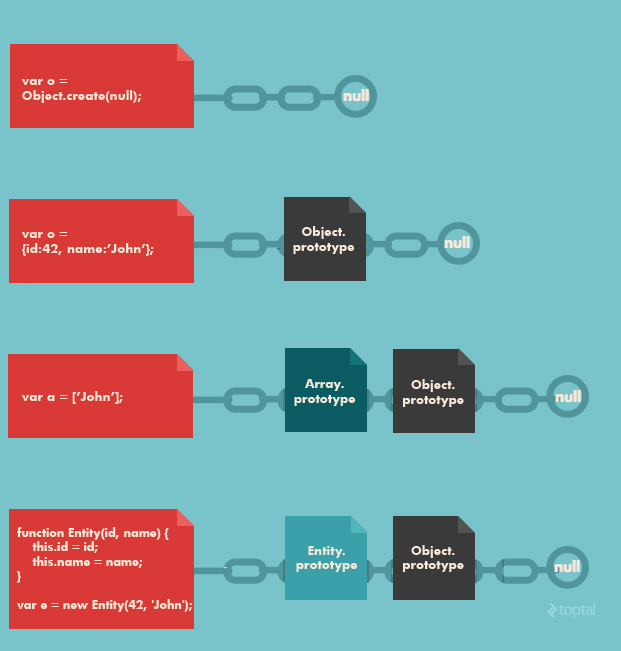
Is there ever any practical difference between defining a function as a function expression (e.g., var foo = function(){}) or as a function statement (e.g., function foo(){})? Explain your answer.
Yes, there is a difference, based on how and when the value of the function is assigned.
When a function statement (e.g., function foo(){}) is used, the function foo may be referenced before it has been defined, through a technique known as “hoisting”. A ramification of hoisting is that the last definition of the function is the one that will be employed, regardless of when it is referenced (if that’s not clear, the example code below should help clarify things).
In contrast, when a function expression (e.g., var foo = function(){}) is used, the function foo may not be referenced before it is defined, just like any other assignment statement. Because of this, the most recent definition of the function is the one that will be employed (and accordingly, the definition must precede the reference, or the function will be undefined).
Here’s a simple example that demonstrates the practical difference between the two. Consider the following code snippet:
function foo() { return 1; }

alert(foo());   // what will this alert?

function foo() { return 2; }
Many JavaScript developers will mistakenly answer that the above alert will display “1” and will be surprised to learn that it will in fact display “2”. As described above, this is due to hoisting. Since a function statement was used to define the function, the last definition of the function is the one that is hoisted at the time it is invoked (even though it is subsequent to its invocation in the code!).
Now consider the following code snippet:
var foo = function() { return 1; }

alert(foo());   // what will this alert?

foo = function() { return 2; }
In this case, the answer is more intuitive and the alert will display “1” as expected. Since a function expression was employed to define the function, the most recent definition of the function is the one that is employed at the time it is invoked.
A multi-paradigm language, JavaScript supports object-oriented, imperative, and functional programming styles. As such, JavaScript accommodates an unusually wide array of programming techniques and design patterns. A JavaScript master will be well aware of the existence of these alternatives and, more importantly, the significance and ramifications of choosing one approach over another. Here are a couple of sample questions that can help gauge this dimension of a candidate’s expertise:
Describe the different ways of creating objects and the ramifications of each. Provide examples.
The graphic below contrasts various ways in JavaScript to create objects and the differences in the prototype chains that result from each.
Is there ever any practical difference between defining a function as a function expression (e.g.,
var foo = function(){}) or as a function statement (e.g., function foo(){})? Explain your answer.
Yes, there is a difference, based on how and when the value of the function is assigned.
When a function statement (e.g.,
function foo(){}) is used, the function foo may be referenced before it has been defined, through a technique known as “hoisting”. A ramification of hoisting is that the last definition of the function is the one that will be employed, regardless of when it is referenced (if that’s not clear, the example code below should help clarify things).
In contrast, when a function expression (e.g.,
var foo = function(){}) is used, the function foo may not be referenced before it is defined, just like any other assignment statement. Because of this, the most recent definition of the function is the one that will be employed (and accordingly, the definition must precede the reference, or the function will be undefined).
Here’s a simple example that demonstrates the practical difference between the two. Consider the following code snippet:
function foo() { return 1; }
alert(foo()); // what will this alert?
function foo() { return 2; }
Many JavaScript developers will mistakenly answer that the above alert will display “1” and will be surprised to learn that it will in fact display “2”. As described above, this is due to hoisting. Since a function statement was used to define the function, the last definition of the function is the one that is hoisted at the time it is invoked (even though it is subsequent to its invocation in the code!).
Now consider the following code snippet:
var foo = function() { return 1; }
alert(foo()); // what will this alert?
foo = function() { return 2; }
In this case, the answer is more intuitive and the alert will display “1” as expected. Since a function expression was employed to define the function, the most recent definition of the function is the one that is employed at the time it is invoked.
The Devil’s in the Details
In addition to the advanced JavaScript concepts discussed thus far, there are a number of lower-level syntactical details of the language that a true JavaScript guru will be intimately familiar with. Here are a few examples…
What is the significance of, and reason for, wrapping the entire content of a JavaScript source file in a function block?
This is an increasingly common practice, employed by many popular JavaScript libraries (jQuery, Node.js, etc.). This technique creates a closure around the entire contents of the file which, perhaps most importantly, creates a private namespace and thereby helps avoid potential name clashes between different JavaScript modules and libraries.
Another feature of this technique is to allow for an easily referenceable (presumably shorter) alias for a global variable. This is often used, for example, in jQuery plugins. jQuery allows you to disable the $ reference to the jQuery namespace, using jQuery.noConflict(). If this has been done, your code can still use $ employing this closure technique, as follows:
(function($) { /* jQuery plugin code referencing $ */ } )(jQuery);
In addition to the advanced JavaScript concepts discussed thus far, there are a number of lower-level syntactical details of the language that a true JavaScript guru will be intimately familiar with. Here are a few examples…
What is the significance of, and reason for, wrapping the entire content of a JavaScript source file in a function block?
This is an increasingly common practice, employed by many popular JavaScript libraries (jQuery, Node.js, etc.). This technique creates a closure around the entire contents of the file which, perhaps most importantly, creates a private namespace and thereby helps avoid potential name clashes between different JavaScript modules and libraries.
Another feature of this technique is to allow for an easily referenceable (presumably shorter) alias for a global variable. This is often used, for example, in jQuery plugins. jQuery allows you to disable the
$ reference to the jQuery namespace, using jQuery.noConflict(). If this has been done, your code can still use $ employing this closure technique, as follows:(function($) { /* jQuery plugin code referencing $ */ } )(jQuery);
- What will be the output of code below?
 var salary = "1000$";

 (function () {
     console.log("Original salary was " + salary);

     var salary = "5000$";

     console.log("My New Salary " + salary);
 })();
The output would be undefined, 5000$. Newbies often get tricked by JavaScript's hoisting concept. In the code above, you might be expecting salary to retain its value from the outer scope until the point that salary gets re-declared in the inner scope. However, due to hoisting, the salary value was undefined instead. To understand this better, have a look of the code below:
 var salary = "1000$";

 (function () {
     var salary = undefined;
     console.log("Original salary was " + salary);

     salary = "5000$";

     console.log("My New Salary " + salary);
 })();
salary variable is hoisted and declared at the top in the function's scope. The console.log inside returns undefined. After the console.log, salary is redeclared and assigned 5000$.
var salary = "1000$";
(function () {
console.log("Original salary was " + salary);
var salary = "5000$";
console.log("My New Salary " + salary);
})();
The output would be
undefined, 5000$. Newbies often get tricked by JavaScript's hoisting concept. In the code above, you might be expecting salary to retain its value from the outer scope until the point that salary gets re-declared in the inner scope. However, due to hoisting, the salary value was undefined instead. To understand this better, have a look of the code below: var salary = "1000$";
(function () {
var salary = undefined;
console.log("Original salary was " + salary);
salary = "5000$";
console.log("My New Salary " + salary);
})();
salary variable is hoisted and declared at the top in the function's scope. The console.log inside returns undefined. After the console.log, salary is redeclared and assigned 5000$.
- What will be the output of the code below?
 // NFE (Named Function Expression
 var foo = function bar(){ return 12; };
 typeof bar();
The output would be Reference Error. To make the code above work, you can re-write it as follows:
Sample 1
 var bar = function(){ return 12; };
 typeof bar();
or
Sample 2
 function bar(){ return 12; };
 typeof bar();
A function definition can have only one reference variable as its function name. In sample 1, bar's reference variable points to anonymous function. In sample 2, the function's definition is the name function.
 var foo = function bar(){
    // foo is visible here
    // bar is visible here
     console.log(typeof bar()); // Work here :)
 };
 // foo is visible here
 // bar is undefine
// NFE (Named Function Expression
var foo = function bar(){ return 12; };
typeof bar();
The output would be
Reference Error. To make the code above work, you can re-write it as follows:
Sample 1
var bar = function(){ return 12; };
typeof bar();
or
Sample 2
function bar(){ return 12; };
typeof bar();
A function definition can have only one reference variable as its function name. In sample 1,
bar's reference variable points to anonymous function. In sample 2, the function's definition is the name function. var foo = function bar(){
// foo is visible here
// bar is visible here
console.log(typeof bar()); // Work here :)
};
// foo is visible here
// bar is undefine
- What will be the output of the code below?
var z = 1, y = z = typeof y;
console.log(y);
The output would be undefined. According to the associativity rule, operators with the same precedence are processed based on the associativity property of the operator. Here, the associativity of the assignment operator is Right to Left, so typeof y will evaluate first , which is undefined. It will be assigned to z, and then y would be assigned the value of z and then zwould be assigned the value 1.
var z = 1, y = z = typeof y;
console.log(y);
The output would be
undefined. According to the associativity rule, operators with the same precedence are processed based on the associativity property of the operator. Here, the associativity of the assignment operator is Right to Left, so typeof y will evaluate first , which is undefined. It will be assigned to z, and then y would be assigned the value of z and then zwould be assigned the value 1.
- What will be the output of the code below?
var trees = ["xyz","xxxx","test","ryan","apple"];
delete trees[3];

  console.log(trees.length);
The output would be 5. When we use the delete operator to delete an array element, the array length is not affected from this. This holds even if you deleted all elements of an array using the delete operator.
In other words, when the delete operator removes an array element, that deleted element is not longer present in array. In place of value at deleted index undefined x 1 in chrome and undefined is placed at the index. If you do console.log(trees) output ["xyz", "xxxx", "test", undefined × 1, "apple"] in Chrome and in Firefox ["xyz", "xxxx", "test", undefined, "apple"].
var trees = ["xyz","xxxx","test","ryan","apple"];
delete trees[3];
console.log(trees.length);
The output would be
5. When we use the delete operator to delete an array element, the array length is not affected from this. This holds even if you deleted all elements of an array using the delete operator.
In other words, when the
delete operator removes an array element, that deleted element is not longer present in array. In place of value at deleted index undefined x 1 in chrome and undefined is placed at the index. If you do console.log(trees) output ["xyz", "xxxx", "test", undefined × 1, "apple"] in Chrome and in Firefox ["xyz", "xxxx", "test", undefined, "apple"].
- What will be the output of the code below?
var Employee = {
  company: 'xyz'
}
var emp1 = Object.create(Employee);
delete emp1.company
console.log(emp1.company);
The output would be xyz. Here, emp1 object has company as its prototype property. The deleteoperator doesn't delete prototype property.
emp1 object doesn't have company as its own property. You can test it console.log(emp1.hasOwnProperty('company')); //output : false. However, we can delete the company property directly from theEmployee object using delete Employee.company. Or, we can also delete the emp1 object using the __proto__ property delete emp1.__proto__.company.
var Employee = {
company: 'xyz'
}
var emp1 = Object.create(Employee);
delete emp1.company
console.log(emp1.company);
The output would be
xyz. Here, emp1 object has company as its prototype property. The deleteoperator doesn't delete prototype property.emp1 object doesn't have company as its own property. You can test it console.log(emp1.hasOwnProperty('company')); //output : false. However, we can delete the company property directly from theEmployee object using delete Employee.company. Or, we can also delete the emp1 object using the __proto__ property delete emp1.__proto__.company.
- What will be the output of the code below?
var x = { foo : 1};
var output = (function(){
    delete x.foo;
    return x.foo;
  })();

  console.log(output);
The output would be undefined. The delete operator is used to delete the property of an object. Here, x is an object which has the property foo, and as it is a self-invoking function, we will delete the foo property from object x. After doing so, when we try to reference a deleted property foo, the result isundefined.
var x = { foo : 1};
var output = (function(){
delete x.foo;
return x.foo;
})();
console.log(output);
The output would be
undefined. The delete operator is used to delete the property of an object. Here, x is an object which has the property foo, and as it is a self-invoking function, we will delete the foo property from object x. After doing so, when we try to reference a deleted property foo, the result isundefined.
- What will be the output of the following code?
var x = 1;
var output = (function(){
    delete x;
    return x;
  })();

  console.log(output);
The output would be 1. The delete operator is used to delete the property of an object. Here x is not an object, but rather it's the global variable of type number.
var x = 1;
var output = (function(){
delete x;
return x;
})();
console.log(output);
The output would be
1. The delete operator is used to delete the property of an object. Here x is not an object, but rather it's the global variable of type number.
- What will be the output of the following code?
var output = (function(x){
    delete x;
    return x;
  })(0);

  console.log(output);
The output would be 0. The delete operator is used to delete properties from an object. Here xis not an object but a local variable. delete operators don't affect local variables.
- Write the code for adding new elements dynamically?
1
2
3
4
5
6
7
8
9
<html>
<head> <title>t1</title>
<script type="text/javascript">
function addNode() { var newP = document.createElement("p");
var textNode = document.createTextNode(" This is a new text node");
newP.appendChild(textNode); document.getElementById("firstP").appendChild(newP); }
</script> </head>
<body> <p id="firstP">firstP<p> </body>
</html>
- Mention what is the disadvantage of using innerHTML in JavaScript?
If you use innerHTML in JavaScript the disadvantage is
- Content is replaced everywhere
- We cannot use like “appending to innerHTML”
- Even if you use +=like “innerHTML = innerHTML + ‘html’” still the old content is replaced by html
- The entire innerHTML content is re-parsed and build into elements, therefore its much slower
- The innerHTML does not provide validation and therefore we can potentially insert valid and broken HTML in the document and break it
- How does type in JavaScript differ from that in other languages?
Unlike C++ and some other programming languages, JavaScript is loosely typed. This means that you can define variables without specifying a particular type. In such a situation, JavaScript automatically assigns the type depending on the value assigned to that variable. [Read more about JavaScript types and conversion]
- What are JavaScript timers? Are there any limitations?
In JavaScript you can use Timers to execute a function after a certain time, or repeat it at certain intervals. The functions used for this are setTimeout (function, delay), setInterval (function, delay), and clearInterval().
The catch is that all timer events run in a single thread. So if you’ve set multiple timers, they may end up interfering with each other. For example, you may still be executing the handler for Timer1 at the moment when Timer2 was meant to fire.. and therefore Timer2 will get delayed. The same holds if Timer2 is just the next instance of a repeating timer.
- How does the virtual destructor work in JavaScript ?
[This is a trick question. The interviewer wants to make sure you’re not mixing up multiple languages]
JavaScript doesn’t have destructors. There’s no particular function called to ‘free’ objects. Instead JavaScript has a garbage collector that runs at regular intervals, cleaning up objects and freeing up memory that is no longer in use.
C++ has virtual destructors and I can explain that if you’d like. [Don’t launch into a detailed explanation. Check if the interviewer’s really interested.
- Are Scope and Context the same?
[Following the previous trick question, the interviewers want to see if you’ll fall for this and say they’re the same.]
Though these words are many times used similarly, they refer to different things. Scope refers to the lifetime or access of a variable when a function is invoked. Context on the other hand, is related to the object. Context is the value of the ‘this’ keyword – the object that owns the currently executing code. [More about scope versus context here]
m==========================================================
var output = (function(x){
delete x;
return x;
})(0);
console.log(output);
The output would be
0. The delete operator is used to delete properties from an object. Here xis not an object but a local variable. delete operators don't affect local variables.- Write the code for adding new elements dynamically?
1
2
3
4
5
6
7
8
9
|
<html>
<head> <title>t1</title>
<script type="text/javascript">
function addNode() { var newP = document.createElement("p");
var textNode = document.createTextNode(" This is a new text node");
newP.appendChild(textNode); document.getElementById("firstP").appendChild(newP); }
</script> </head>
<body> <p id="firstP">firstP<p> </body>
</html>
|
- Mention what is the disadvantage of using innerHTML in JavaScript?
If you use innerHTML in JavaScript the disadvantage is
- Content is replaced everywhere
- We cannot use like “appending to innerHTML”
- Even if you use +=like “innerHTML = innerHTML + ‘html’” still the old content is replaced by html
- The entire innerHTML content is re-parsed and build into elements, therefore its much slower
- The innerHTML does not provide validation and therefore we can potentially insert valid and broken HTML in the document and break it
- How does type in JavaScript differ from that in other languages?
Unlike C++ and some other programming languages, JavaScript is loosely typed. This means that you can define variables without specifying a particular type. In such a situation, JavaScript automatically assigns the type depending on the value assigned to that variable. [Read more about JavaScript types and conversion]
- What are JavaScript timers? Are there any limitations?
In JavaScript you can use Timers to execute a function after a certain time, or repeat it at certain intervals. The functions used for this are
setTimeout (function, delay), setInterval (function, delay), and clearInterval().
The catch is that all timer events run in a single thread. So if you’ve set multiple timers, they may end up interfering with each other. For example, you may still be executing the handler for Timer1 at the moment when Timer2 was meant to fire.. and therefore Timer2 will get delayed. The same holds if Timer2 is just the next instance of a repeating timer.
- How does the virtual destructor work in JavaScript ?
[This is a trick question. The interviewer wants to make sure you’re not mixing up multiple languages]
JavaScript doesn’t have destructors. There’s no particular function called to ‘free’ objects. Instead JavaScript has a garbage collector that runs at regular intervals, cleaning up objects and freeing up memory that is no longer in use.
C++ has virtual destructors and I can explain that if you’d like. [Don’t launch into a detailed explanation. Check if the interviewer’s really interested.
- Are Scope and Context the same?
[Following the previous trick question, the interviewers want to see if you’ll fall for this and say they’re the same.]
Though these words are many times used similarly, they refer to different things. Scope refers to the lifetime or access of a variable when a function is invoked. Context on the other hand, is related to the object. Context is the value of the ‘
this’ keyword – the object that owns the currently executing code. [More about scope versus context here]
m==========================================================

No comments:
Post a Comment